













We Make Recovery Simple, Transparent, and Trustworthy.
– – Full features unlocked in the free version — no limits
– – Recover up to 2GB for free, with full preview before payment
– – What you see is what you get — no tricks, no hidden fees
– – Up to 99.8% recovery success rate — trusted, professional results
No gimmicks, no bloat — just what you truly need
Free Download Get Started
Restore
• Step 1: Smart scan detects lost files
• Step 2: Preview before recovery
• Step 3: Restore with one click
Certified Security
XRecovery is a data recovery software designed specifically for the Windows platform. It helps users retrieve lost or accidentally deleted files from a wide range of storage devices. Whether it’s a hard drive, USB flash drive, memory card, or mobile device, as long as it can be recognized by the Windows system, XRecovery can provide fast and reliable data recovery support.
Supports a wide range of scenarios, including accidental file deletion, formatted partitions, system crashes, virus attacks, and lost or damaged partitions.
In addition to common Windows file systems, XRecovery is also compatible with major file systems used by macOS and Linux.
XRecovery offers two scanning modes to meet different recovery needs. Quick Scan is ideal for minor data loss, while Deep Scan is designed to handle complex corruption issues or RAW devices with greater precision.
Even when the file system is damaged or unrecognizable, XRecovery can still restore data by analyzing the disk’s underlying data structures—as long as the device can be detected by the system.
Features a clean and intuitive workflow designed to accommodate both professionals and everyday users.
XRecovery supports nearly all major file systems, ensuring seamless cross platform compatibility.
Operating System | File System Types | Support |
Windows | FAT16、FAT32、exFAT、NTFS/NTFS5、ReFS | |
macOS | HFS、HFS+、APFS | |
Linux | EXT2、EXT3、EXT4 | |
Others | RAW devices (no file system or corrupted partitions) |
| Product Name | Key Features | Target Users | Region |
| Stellar Data Recovery | Powerful deep scan capabilities, specialized recovery for videos and photos | Primarily personal users | India |
| R-Studio | Enterprise – grade features, supports RAID and network recovery, multi – platform compatibility | Professional users | United States |
| Disk Drill | Cross – platform (Windows/Mac), supports various file systems, intuitive interface | Primarily personal users | United States |
| XRecovery | Windows – based, high cost – performance ratio, quality on par with mainstream competitors | Personal users | Hong Kong, China |
R – Studio currently delivers the best recovery quality among all competitors. However, its SEO presence is weak, making it uncompetitive in the personal – user market. For now, it is not a primary consideration.
XRecovery’s recovery quality currently leads the personal – user market, standing on the same performance tier as Disk Drill, EaseUS, and Recoverit.
| Software | Monthly Price | Annual Price | Free Quota / Preview | Video Recovery Optimization | Main Drawbacks |
| XRecovery | $29.99 | $59.99 | Recover up to 2GB for free; full data preview available | Optimized for camera storage; high video recovery success rate | Lower brand recognition |
| Disk Drill | $89 (PRO version)) | $89 (one – time license with upgrades) | Free version supports scan & preview only; recovery requires payment; 512MB free quota | Includes video optimization | High price; limited preview |
XRecovery is designed to handle a wide range of data - loss situations, ensuring reliable recovery across diverse devices and storage conditions. The software intelligently analyzes both file - system structures and underlying raw data, enabling successful restoration even in complex or severe cases. Supported scenarios include:
XRecovery is built to retrieve your lost or deleted files—no matter the format. From everyday documents and cherished photos to large video archives and compressed folders, its intelligent scan engine locates and restores a wide range of file types with precision. Whether accidental or caused by system failure, XRecovery recovers your data—fast and reliably. Your files, restored. Your peace of mind, guaranteed.
DOC, DOCX, RTF, XLS, XLSX, XLSB, PPT, PPTX,PPS, PDF, DOT, DOTX, XLSB, XLT, XLTX, POT,PPSX, etc.
CRW, JPEG, JPG, PNG, PSD, RAW, RGB, 3DM, 3DMF, 3FR, ABM, AFX, ANI, ART, ARW, BIZ, BLD, etc.
AVI, FLA, FLV, M4V, MOV, MP4, WMV, 3G2,3GP, 3GP2, 3GPP, AMV, ANM, ASF, ASX, etc.
AAC, AIFF, ALAC, FLAC, MP3, OGG, PCM, WAV, WMA, A52, AA, AA3, AAC, AC3, ACC, AFC, AIF, etc.
ZIP (Extended Zip File), RAR (WinRAR Compressed Archive), DMG (Mac OS X Disk Image), 7Z (7-Zip Compressed), CAB (Windows Cabinet File).
MSG, PST, OST, EML, EMLX, MBOX, EPUB, JIS,KEY, LOG, MPS, 3DA, 3DS, 3TF, 3WS, ABD, etc.
Recover deleted or lost files from a wide range of Windows-compatible devices with XRecovery. Whether it’s your PC’s internal hard drive, an external USB, SD card, SSD, digital camera, or even a virtual disk or RAID array—XRecovery ensures seamless file restoration across all major storage types. Fully compatible with Windows 11, 10, 8, and 7.
Supports Dell®, HP®, Lenovo®, Acer®, Asus®, MSI®, Surface® and other Windows-based devices
Designed for full compatibility with USB drives, external SSDs, and removable media from brands like SanDisk®, Samsung®, Kingston®, and more
Compatible with top-tier brands for onboard SD and SF card storage, including SanDisk®, Transcend®, Toshiba®, Lexar®, Integral®, SP®, PNY®, Kingston®, and more
Whether it's an internal SSD, a legacy HDD, or a portable USB drive, our system works with any device that Windows can recognize and mount as a storage volume
Compatible with memory cards from all major camera brands, including Samsung®, HP®, Sony®, GoPro®, Canon®, Sigma®, Nikon®, Epson®, Panasonic®, and more
Full support for removable drives across all major formats. Works seamlessly with USB flash drives, external SSDs/HDDs, and card-based storage devices—if Windows sees it, we support it
XRecovery streamlines the data recovery process into three quick and intuitive steps—scan, preview, and restore. Whether you’ve lost documents, photos, videos, or other file types, our Windows-compatible recovery tool helps you retrieve data from hard drives, USBs, SD cards, and more. Designed for everyone—no technical expertise needed—just fast, reliable results.

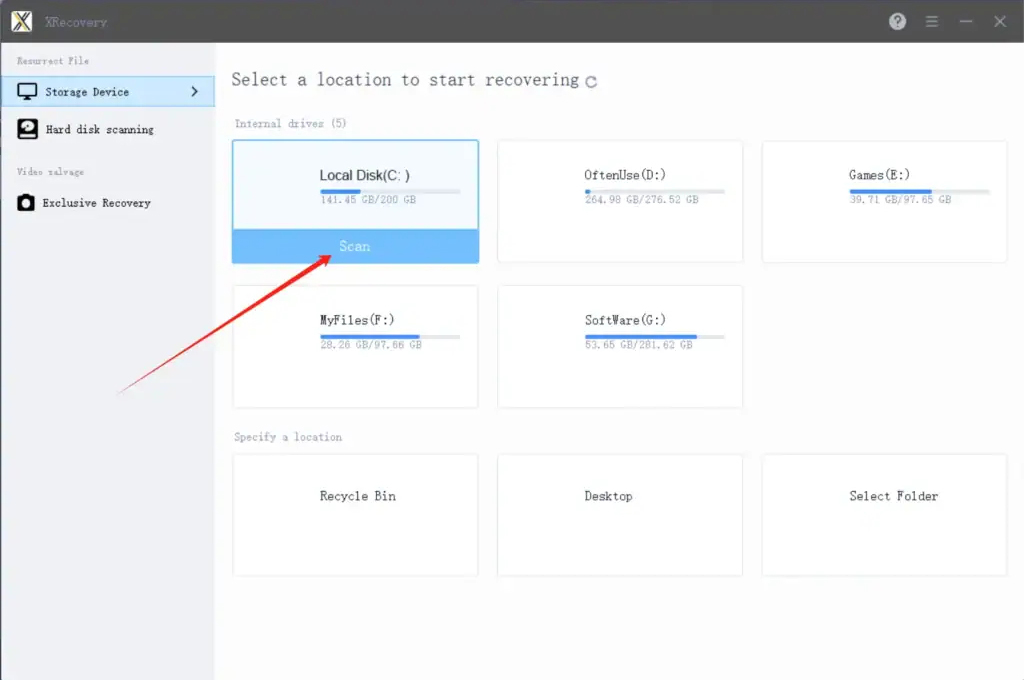
Start XRecovery and select the target disk to begin scanning
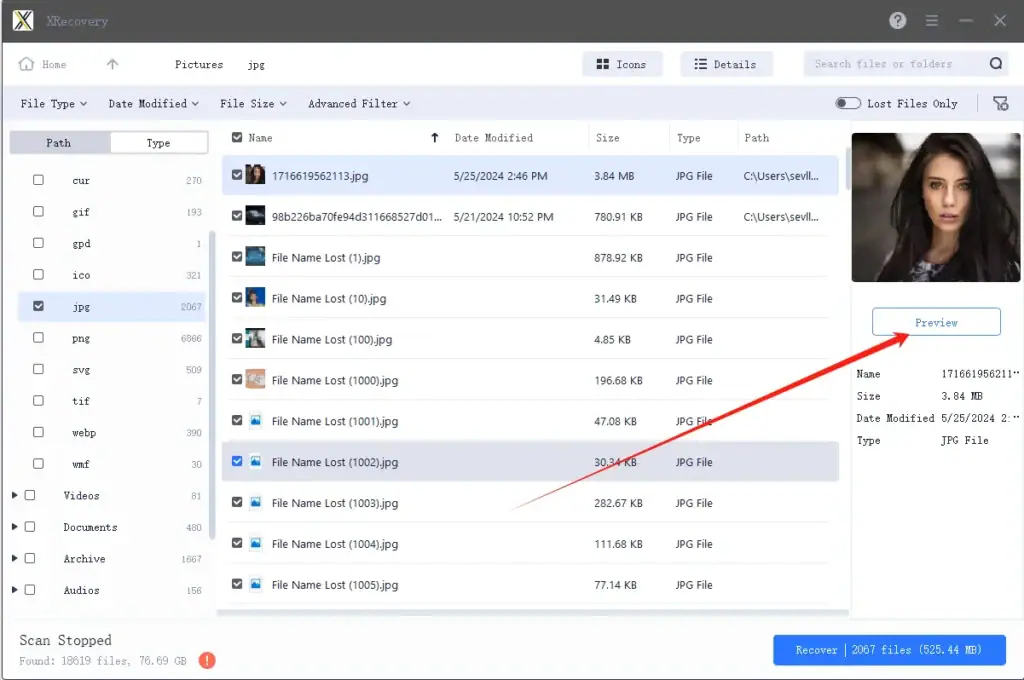
Find the files you lost or deleted and preview the results
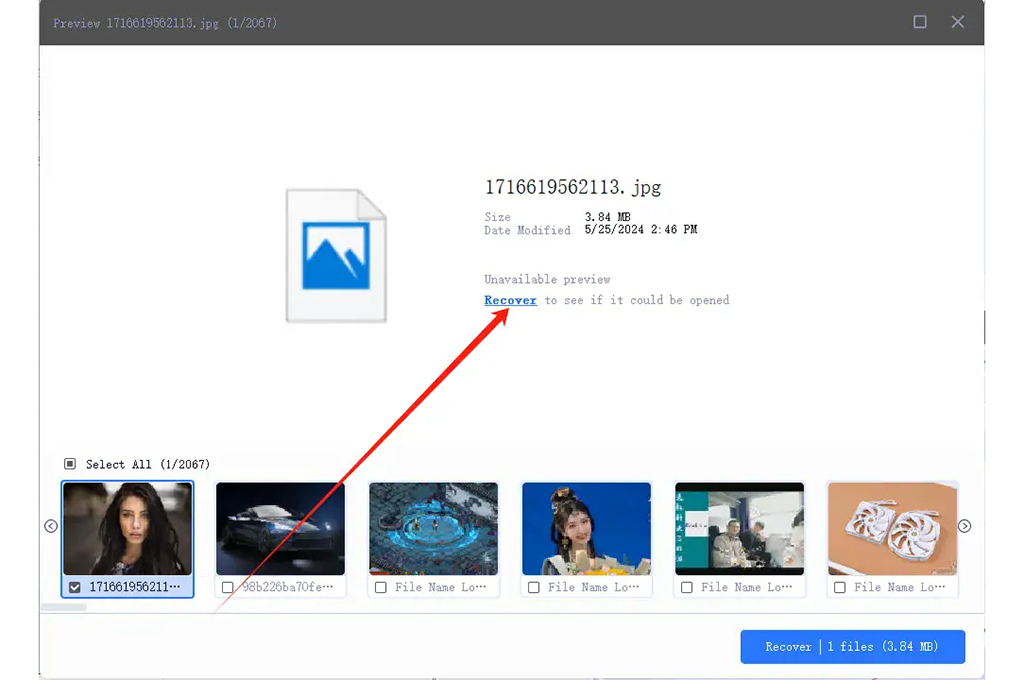
Experience the relief of recovering your lost data
Whether you’re a professional photographer or capturing everyday moments, XRecovery is built to handle the unique challenges of camera-based storage. Our enhanced algorithms are tuned for major brands and RAW formats, helping you recover high-quality files with precision—even from corrupted or formatted media.
Bring back RAW photos with full resolution and metadata—perfect for editing, archiving, and publishing
Recovers damaged SD cards and fragmented files using intelligent reconstruction algorithms
XRecovery’s enhanced algorithm restores deleted files from SD cards used in Canon, Nikon, Sony, GoPro, DJI, and Insta360 devices—fast, accurate, and read-only safe
Data Recovery Software for Any Data Loss Scenario
XRecovery is a flexible data recovery tool that can help you restore your deleted files in virtually any data loss scenario. Here are some of them.
Deleted your files in a rush? XRecovery brings back data you thought was gone for good—even after the Recycle Bin has been emptied
Accidentally deleted files are one of the most common data loss issues. XRecovery is a trusted solution used by thousands to recover deleted documents, photos, and more—quickly and reliably
Plug your damaged hard drive into a working system running XRecovery—our advanced recovery engine will scan, rebuild, and restore lost files with precision
Accidentally formatted the wrong drive? XRecovery can restore lost files and folders from most external drives—even after a full format. Fast, reliable, and file-safe
Malware can strike without warning, wiping out important files. XRecovery restores data lost to viruses with smart, file-safe recovery—fast, reliable, and stress-free
Accidentally deleted or lost a disk partition? XRecovery’s deep scan engine restores files and folders from missing partitions with precision—no matter the cause
When your drive suddenly shows up as RAW in Windows, XRecovery can safely extract your files before you reformat—no data left behind, no stress
Lost files due to a corrupted memory card? XRecover scans and restores photos, videos, and documents from SD, microSD, and other card types—quick, safe, and hassle-free
XRecovery uses advanced scanning algorithms to detect and restore deleted files from Windows systems. Simply select the drive, choose a scan mode, and preview recoverable files before restoring.
Yes. XRecovery operates in read-only mode during scans, ensuring no changes are made to your original data. Your files remain untouched and secure throughout the recovery process.
In most cases, manual recovery is not possible. Once data is deleted, it’s marked as free space by the system. XRecovery accesses this space before it’s overwritten, making recovery possible.
Recovery time depends on the size of the drive and the scan mode. Quick scans may take minutes, while deep scans on large drives can take longer. XRecovery provides progress indicators and estimated time.
XRecovery offers a free trial that allows you to scan and preview recoverable files. Full recovery requires a license, but you can evaluate results before purchasing.